How to Automate Employee Travel Expense Reimbursements in Canada

Business travel can leave finance teams juggling receipts, expense reports, approvals and employee repayments. Handling each claim manually creates extra administrative work and can delay reimbursements.
With the right expense reimbursement software, businesses can automate submissions, approvals and payouts while keeping travel expenses organized and visible to finance.
Here's how to automate employee expense reimbursements for travel and what to look for in a solution.
Key takeaways
- Set clear travel expense policies: Define eligible expenses, spending limits, receipt requirements and approval rules before automating reimbursements.
- Automate submissions, approvals and payouts: Use reimbursement software to capture receipt details, route requests for approval and pay employees back faster.
- Connect reimbursements to accounting: Sync approved expenses with your accounting software to reduce manual data entry, simplify reconciliation and improve expense tracking.
1. Establish a clear travel expense policy
Before automating reimbursements, establish rules for what employees can claim and how they should submit expenses.
A travel expense policy sets clear expectations for employees and helps managers make consistent approval decisions. It should outline:
- Eligible expenses: Flights, accommodation, meals, ground transportation, parking and mileage.
- Spending limits: Daily meal allowances, hotel budgets and transportation limits.
- Receipt requirements: Which expenses require itemized receipts and what supporting documentation employees must provide.
- Approval requirements: Who needs to approve expenses and whether additional approval is required for larger purchases.
- Submission deadlines: How soon employees must submit expenses after returning from a trip.
Canadian businesses should also consider CRA documentation requirements, including recording the business purpose of expenses and retaining supporting receipts. Finance teams should understand which expenses qualify for GST/HST input tax credits and how travel allowances are treated for tax purposes.
A documented policy makes it easier to configure automated submission requirements and approval workflows. Check out Float's travel expense policy template for an easy way to build out consistent rules.
2. Move expense submissions online
Paper receipts, spreadsheets and email submissions make expense management a headache for everybody. Employees may submit claims weeks after a trip, while finance teams spend time entering information and manually checking receipts.
Expense reimbursement software gives employees one place to submit expenses and supporting documentation.
Look for a solution that allows employees to:
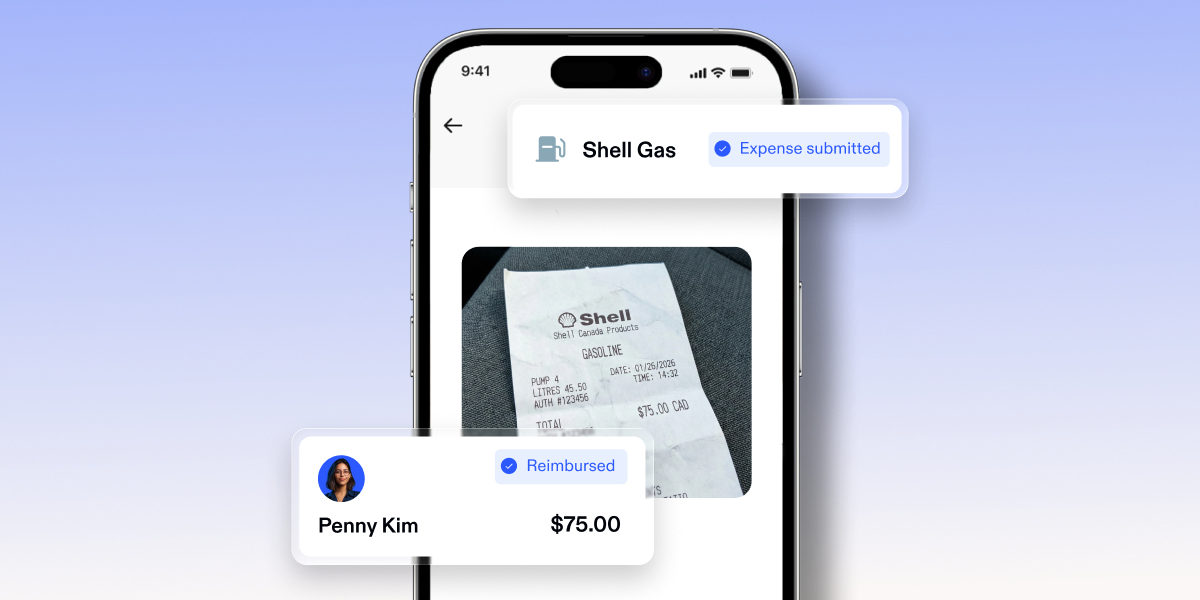
- Upload receipts directly from their phones.
- Submit multiple expenses in one report.
- Enter expense descriptions and business purposes.
- Track the status of submitted reimbursement requests.
Receipt scanning can further reduce manual work. Optical character recognition (OCR) technology extracts information such as the merchant, transaction date, amount, and tax from uploaded receipts, reducing what employees need to enter.
Float Reimbursements uses receipt scanning to automatically populate expense details, which employees can review before submitting their reports. This makes it easier to capture information while receipts are still available, rather than chasing documentation at month-end.
3. Automate expense approvals
Once an employee submits a reimbursement request, it needs to reach the right person for review.
Without an automated workflow, finance teams often have to forward expense reports manually, follow up with managers and track approvals in separate spreadsheets.
Reimbursement software can route requests automatically based on predefined approval rules.
For example, a business might configure its workflow so that:
- Employees' direct managers approve routine travel expenses.
- Department heads review expenses that exceed standard spending limits.
- Finance reviews documentation, tax codes and policy exceptions before payment.
These rules help ensure expenses reach the right approvers without unnecessary back-and-forth.
With Float, businesses can create custom reimbursement approval policies, including multi-level approval workflows. Reports route to the right approvers, giving finance teams more control over expense reviews.

Make expense management even easier.
Streamline your business spending with automation tools built right into Float.
4. Automate employee reimbursement payouts
Getting an expense approved is only part of the process. Businesses also need a reliable way to reimburse employees.
Manually processing individual bank transfers adds another administrative step, particularly when several employees return from business trips around the same time.
Reimbursement platforms with direct payout capabilities can simplify this process by letting finance teams schedule payments in the same system they use to review expenses.
Float allows businesses to schedule direct reimbursement payouts in CAD and USD through supported EFT and ACH workflows. Employees can connect their personal bank accounts to receive payments, subject to currency, account and plan eligibility.
By keeping approvals and payments in one place, finance teams can spend less time switching between platforms and employees have better visibility into when they'll receive their money.
5. Connect reimbursements to your accounting software
Travel expenses need to be recorded accurately in a company's financial records. When reimbursement information is entered manually into accounting software, finance teams risk duplicate entries, missing receipts and inconsistent expense coding.
Choose reimbursement software that integrates with your existing accounting platform.
An integration can help automate tasks such as:
- Syncing approved reimbursement reports.
- Mapping expenses to general ledger (GL) accounts.
- Applying relevant tax codes.
- Attaching receipts to expense records.
- Reducing manual reconciliation at month-end.
This gives finance teams a more consistent record of employee travel expenses without re-entering information across multiple systems.
6. Consider corporate cards for recurring travel expenses
Not every travel expense needs to go through reimbursement. If employees travel regularly for work, assigning corporate cards can reduce the number of out-of-pocket expenses they need to submit.
Businesses can issue employees physical or virtual corporate cards for approved travel purchases, including flights, hotels and meals. Spending limits and merchant controls help finance teams manage budgets while giving employees access to company funds.
Reimbursements still play an important role for expenses employees pay personally, such as mileage or unexpected travel costs. Using both corporate cards and reimbursements gives businesses more flexibility.
Automate travel reimbursements with Float
Automating employee travel reimbursements can reduce manual data entry, speed up approvals and give finance teams better visibility into company expenses.
Float brings reimbursement submissions, receipt scanning, customizable approval workflows, direct payouts and accounting integrations together in one platform. Employees can submit expenses through the mobile app or web platform, while finance teams can review requests, schedule payments and export approved reports.
Reimbursements are included in all Float plans, so businesses can manage employee expenses without buying a separate reimbursement tool.
Explore Float Reimbursements to see how your business can simplify expense submissions, approvals and employee payouts.
Frequently asked questions
How do I automate employee expense reimbursements for travel?
Start by creating a clear travel expense policy, then use reimbursement software to collect digital receipts, capture expense details, route submissions for approval and process employee payouts. Connecting the software to your accounting platform can also reduce manual reconciliation.
Can employees submit travel expenses from their phones?
Yes. Many reimbursement platforms offer mobile apps that allow employees to upload receipts, enter expense details and submit claims while travelling. For example, Float lets employees create reimbursement reports and scan receipts through its mobile app.
What travel expenses can employees claim in Canada?
Eligible expenses depend on company policy and the trip's business purpose. Common examples include airfare, hotels, meals, taxis, rideshares, parking and mileage for business-related driving. Businesses should document their reimbursement rules and follow applicable CRA requirements.
Are employee travel reimbursements taxable in Canada?
Generally, reimbursements for reasonable business expenses employees incur while performing their employment duties are not taxable benefits when properly documented. However, flat allowances, personal expenses and certain payments may have different tax treatment. Businesses should consult CRA guidance or a tax professional when determining how specific payments should be handled.