AI Invoice Capture or OCR? Answers for Your AP Team
In this article

Manual invoice processing can take more time than most small finance teams can afford. Between entering vendor details, checking invoice amounts, assigning accounting codes and tracking approvals, even a relatively simple accounts payable (AP) process can involve plenty of repetitive work.
Invoice capture tools help reduce that workload by extracting information from invoices and turning it into usable digital records. Two terms you'll often come across are optical character recognition (OCR) and AI-powered invoice capture. While they're closely related, they don't offer exactly the same capabilities.
Understanding the difference can help your AP team decide whether traditional OCR is enough or whether it's time to invest in a more advanced automation tool.
Key takeaways
- Traditional OCR reduces manual data entry by extracting key invoice details, but may still require manual review, corrections and accounting code assignments.
- AI-powered invoice capture goes beyond text extraction by interpreting information, flagging duplicates and automating additional AP tasks.
- The right solution depends on your AP workflow, with AI automation offering more value for businesses processing higher invoice volumes or managing complex processes.
What is OCR invoice capture?
Optical character recognition (OCR) scans documents and converts printed or typed text into machine-readable information.
For AP teams, OCR can extract important invoice details, including:
- Vendor names and contact information
- Invoice numbers and dates
- Payment terms and due dates
- Line items and descriptions
- Subtotals, taxes and total amounts
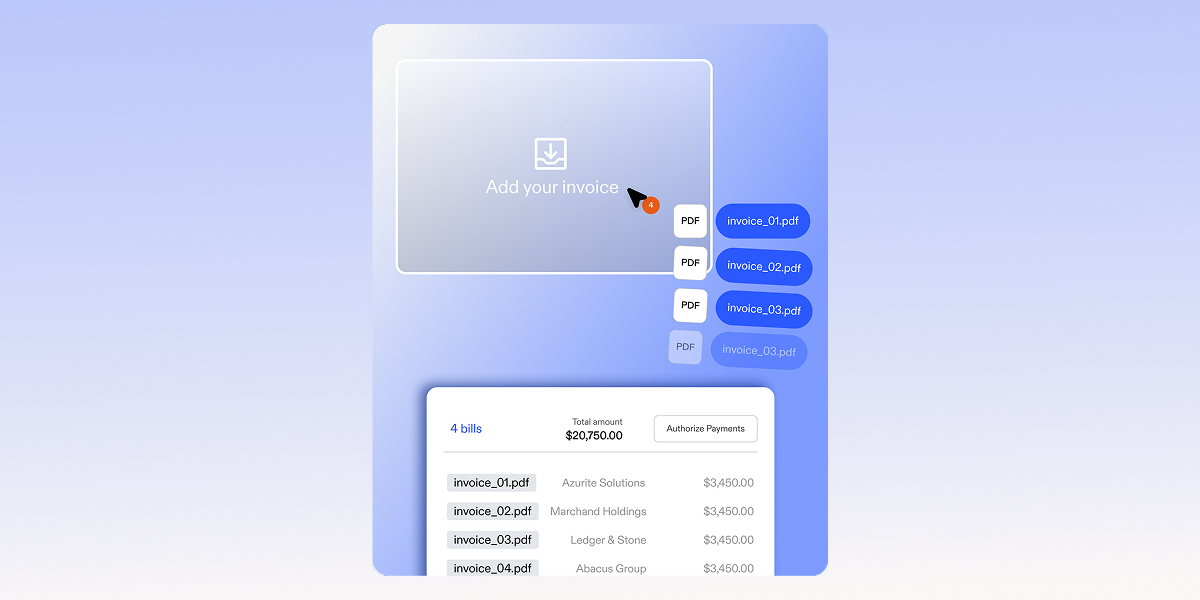
Instead of manually entering these details into an accounting system, an OCR tool reads the invoice and automatically populates the relevant fields.
This is particularly useful for small businesses that process recurring invoices from the same vendors. Rather than entering the same information every month, finance teams can use OCR to speed up data entry and reduce common transcription errors.
However, traditional OCR has limitations. It primarily focuses on recognizing text, so it may struggle with inconsistent layouts, poor-quality scans or complex invoice formats. Someone may still need to review extracted information, correct errors and assign the appropriate accounting codes.
What is AI-powered invoice capture?
AI-powered invoice capture builds on OCR by using technologies such as machine learning and natural language processing to interpret extracted information.
Rather than simply recognizing text, AI uses context to understand what the information represents and how to handle it.
For example, an AI-powered tool may recognize that an amount labeled "Balance Due" represents the outstanding payment, even if the invoice uses a different layout than previous documents. It can also learn from historical invoice data to recognize recurring vendors, identify patterns and suggest accounting categories.
Depending on the platform, AI-powered invoice capture may also support:
- Automated data extraction: Identifies and populates invoice fields, including vendor details, line items and tax information.
- Duplicate detection: Flags invoices that appear to have already been submitted or processed.
- Invoice validation: Identifies missing information, unusual amounts or inconsistencies that need attention.
- Automated coding: Suggests GL and tax codes based on previous transactions and business rules.
- Workflow automation: Routes invoices to the right approvers based on predefined rules.
The goal is to move beyond simply digitizing invoices and automate more of the work that happens after they're received.
AI invoice capture vs. traditional OCR: What's the difference?
Both technologies reduce manual data entry, but AI-powered invoice capture can take automation further by interpreting information and supporting additional AP tasks.
Here's how they compare:
It's worth noting that modern OCR solutions can also include templates, validation rules and duplicate detection. The distinction isn't always black-and-white. Many modern AP platforms combine OCR with AI, rather than offering them as completely separate technologies.
Does your AP team need AI invoice capture or OCR?
The right solution depends on how many invoices your business processes, how complex they are and how much manual work remains after extraction.
Traditional OCR may be enough if:
- Your business processes a relatively low volume of invoices.
- Most vendors use consistent invoice formats.
- Your existing software extracts information accurately.
- Your team doesn't mind reviewing and coding invoices manually.
AI-powered invoice capture may be worth considering if:
- Your business receives invoices from many different vendors.
- Your AP team spends considerable time correcting extracted information.
- You regularly deal with duplicate invoices or inconsistent documentation.
- Manual coding and invoice approvals are slowing down payment processing.
- Your business is growing and needs a more scalable AP workflow.
You don't necessarily need to replace your existing OCR system just because AI tools are available. Start by identifying where your current process creates the most work. If data extraction is already accurate, you may get more value from automating invoice coding, approvals or payment scheduling instead.
What to look for in an AP automation tool
Whether you choose an OCR-based solution or a more advanced AI-powered platform, invoice capture should fit into your broader accounts payable workflow.
Consider these AP software features when comparing providers:
- Accurate data extraction: Look for software that captures vendor information, invoice numbers, dates, line items, amounts and applicable taxes.
- Duplicate detection: The platform should flag potentially duplicated invoices before they're approved or paid.
- Accounting integrations: Check whether the software connects with your existing accounting system, such as QuickBooks Online or Xero, to reduce double entry.
- Approval workflows: Look for customizable approval rules that route invoices to the right people based on your business policies.
- Payment capabilities: Consider whether you can schedule and send vendor payments directly through the platform.
- Exception handling: Make sure your team can review flagged invoices, correct information and maintain oversight over automated decisions.
For example, Float combines AI-powered OCR invoice extraction with Payments, allowing businesses to capture invoice details, manage approvals and process payments in one platform. Float Intelligence also uses AI to suggest GL and tax codes for card transactions and automate receipt matching, helping finance teams reduce manual work beyond invoice processing.
Making invoice processing easier for your AP team
OCR and AI-powered invoice capture can both make accounts payable more efficient, but the right choice depends on where your team needs the most support.
Traditional OCR is a useful starting point for reducing manual data entry. AI-powered tools take automation further by interpreting invoice information, identifying potential issues and supporting additional accounting tasks.
For small businesses looking to scale, the biggest benefit isn't necessarily having the most advanced technology. It's finding an AP automation solution that reduces repetitive work, improves accuracy and gives your finance team more time to focus on managing the business.
Frequently asked questions
What is the difference between OCR and AI invoice capture?
Traditional OCR recognizes and extracts text from invoices, while AI-powered invoice capture uses machine learning to interpret information, identify patterns and automate additional AP tasks like duplicate detection and invoice coding.
Can AI invoice capture replace manual invoice processing?
AI invoice capture can automate tasks like data extraction, invoice validation and accounting code suggestions, reducing the need for manual data entry. However, human oversight is still important for reviewing exceptions, verifying information and approving payments.
Is AI invoice capture more accurate than traditional OCR?
AI-powered invoice capture can improve extraction accuracy by using context and historical data to interpret invoice information. However, accuracy depends on the software, document quality and how well the system is configured. Both technologies may require manual review.
Does AI invoice capture integrate with accounting software?
Many AI-powered invoice capture tools integrate with accounting platforms like QuickBooks Online and Xero. These integrations help transfer invoice details, reduce duplicate data entry and keep financial records up to date.