In small startups or lean finance teams, employees using personal credit cards for business expenses can feel like a necessary evil. It’s quick, familiar and avoids the complexity of setting up corporate cards—at least for a while.
But as your business grows, so do the risks of mixing personal finances with business. What starts as a simple workaround can quietly create financial blind spots, employee friction and policy headaches. Personal cards seem easier until receipts go missing, reimbursements lag and someone’s chasing down records for a $1,000 steak dinner.
So, which is right for your business?
Let’s walk through the pros and cons of both options, as well as smart steps you can take to make the shift without overhauling everything.
Why credit cards are used for business expenses
As your business evolves, so will your financial needs. With things moving at a faster pace, it’s natural for more transactions to move towards credit cards. In fact, monthly credit card spend has gone up 18% on average for small businesses in Canada over the past few years.
As an owner, using a personal credit card for company expenses might feel convenient, but it can blur the lines between business and personal finances fast. And any additional balance you end up carrying could hurt your chances of gaining the personal credit you need, like a mortgage or car loan.
On the other hand, the biggest reason employees use personal cards is simple: they don’t have access to company funds when needed. This shows up most often in time-sensitive situations like grabbing office supplies, taking clients out for lunch or covering travel expenses on the fly. In many companies, only a few senior leaders have corporate cards. So when something comes up unexpectedly, employees do what they can: they put it on their own cards and submit for reimbursement later.
Should you let employees use personal credit cards or explore a corporate credit card program?
From an operations standpoint, letting employees use personal credit cards for business expenses might seem harmless. Until it snowballs into various levels of chaos.
Can it work at the beginning? Sure. Is there usually a tipping point where it’s no longer the best idea? Definitely.
Using personal credit cards for business in Canada
Letting employees use personal cards does offer short-term advantages. No setup or new systems are required, and employees can access funds immediately if they have credit room.
And employees certainly do like earning those sparkly personal reward points.
But those benefits don’t hold up under pressure at a growing business, and suddenly your “simple” system is eating your month-end close alive before you know it.
Here’s where personal cards become a liability:
Equity and access: Not every employee can afford to front expenses. It can be presumptuous to assume all staff have personal credit available, especially for large expenses like flights or hotel bookings.
Delayed visibility: Finance teams don’t see the spend until the expense report comes in, which often means late, incomplete or unclear financial data.
Reimbursement friction: Employees can be left floating thousands of dollars for weeks while they wait for approvals and payroll cycles.
Illusion of control: Many finance leaders believe reimbursements encourage frugality. In reality, once the spend has happened, there’s little recourse beyond a stern conversation. Most expenses still get reimbursed, and the money still goes out the door.
Providing corporate credit cards for business expenses
On the other hand, corporate credit cards (especially modern ones) give finance teams actual control and oversight through:
Pre-set spend limits by person, team or category
Real-time visibility into purchases
Automated integrations with spend management tools
Easier, faster reconciliation and month-end close
No financial burden on the employee
Company benefits tied to rewards related to spending (cash back, anyone?)
Of course, corporate cards aren’t a magic fix. Some finance leaders worry that giving everyone access to company money invites misuse.
However, that concern is fading with more modern corporate credit cards options. Today’s tools make it possible to issue credit cards for business expenses with as little as zero balance, only funding them as needed with strict and customizable rules.
Best business credit cards
Compare top options, fees and benefits for Canadian companies.
What finance leaders should do about company expense management
You don’t have to go from zero to 100 overnight. There are smart and manageable steps finance teams can take to move away from personal card use and toward a more efficient, equitable system:
1. Start small with high-impact teams
Roll out corporate cards to a specific group like the sales team, execs who travel often or operations staff handling frequent purchases. Focus on the team with the most frequent or high-dollar spend to make the biggest immediate difference.
2. Use zero-balance cards as a safeguard
Give employees cards with no preloaded funds. When they need to make a purchase, approved funds can be issued instantly. This creates access without risk and keeps finance firmly in control.
3. Build clear policies before scaling
Don’t wait until you’ve distributed cards to create an expense policy. Define what’s allowed, who approves it and what the guardrails are. The more clarity you provide up front, the fewer issues you’ll have down the road.
4. Prioritize education and support
Corporate card programs are only as effective as the communication around them. Help employees understand when and how to use their cards and what to do if something changes. You’re not restricting spending; you’re empowering them with the right tools to do their jobs.
5. Use tools that give real-time oversight
Pair your cards with expense management software that shows transactions as they happen, not after the fact. This gives you tighter control, easier audits and way less chasing after receipts.
6. Revisit and adjust as you grow
Don’t treat your first rollout as the final answer. As your company evolves, so will your needs. Periodically review your cardholders, limits and policy to make sure your program is scaling with you.
Make expense management even easier
Streamline your business spending with automation tools built right into Float.
Float: Corporate cards with flexibility built right in
Using personal credit cards for business in Canada isn’t the only option for your team. Reimbursements might work in a pinch, but they don’t scale. Corporate credit cards can flip the script, especially when paired with the right tools and policies. They make company funds accessible without giving up control.
Ready to see how simple spend management can be?
Float makes it easy to issue cards with custom limits, track spend in real time and scale your program at your own pace.
Your cash flow statement can provide precious insights about the health of your business and give you the information you need to make strategic financial decisions. But for small business owners who don’t have an accounting background, reading financial statements can feel like decoding ancient Egyptian hieroglyphs. Creating them can be just as confusing. To get value out of your cash flow statements, you need to know when to use them and how to analyze them.
In this guide we go beyond the basics of what is business cash flow. We’ll cover how to prepare a cash flow statement, illuminate the nuances of direct vs indirect cash flow statement methods and take a look at a cash flow statement example so you can read your own like a pro.
What is a cash flow statement?
A cash flow statement (CFS) summarizes the inflow and outflow of cash in your business over a specific period of time, usually a month. It tells you how much operating cash you have on hand to spend. This cash contributes to your business’ liquidity—your ability to pay bills and debts, also known as liabilities, with cash or the current assets you own. Along with the income statement and balance sheet, it’s one of the three core financial statements that businesses are required to generate.
Who prepares cash flow statements?
We hate to break it to you, but every small business owner should know how to either prepare or read a cash flow statement. It can give you a serious edge when you’re making business decisions. If you have a bookkeeper, they can prepare your CFS and give you insights about how your cash flow is doing. In larger companies, the accounting team is usually responsible for creating cash flow statements as part of quarterly or annual financial reporting.
Why creating a cash flow statement is important for your business
Creating and analyzing your cash flow statements on a regular basis gives you insight into how well you’re managing cash and whether you’re striking a healthy balance between your investments and your cash on hand.
Understanding your cash flow statement can help you assess whether you’re generating enough cash to cover your regular operating expenses. If you’re struggling with cash flow, it may be time to seek out a loan or find ways to cut costs.
Looking at your cash flow over time can help you determine whether your financial strategy will work for your business in the long run. It can also help you figure out whether you’re ready to invest in the next stage of growth and provide a starting point for your financial strategy for expansion efforts, like hiring more team members or buying materials for a new product line.
How to prepare a cash flow statement
There are two main approaches you can take to generating your CFS: the direct method and the indirect method. Understanding the direct vs indirect cash flow statement methods can help you determine which one is the right fit for you and your business—one of them is definitely the better option for growing businesses (and busy owners), but we’ll let you decide.
Cash flow statement direct method
The cash flow statement direct method requires you to keep a record of every single time cash leaves or hits your bank accounts during the reporting period. When you’re ready to prepare the CFS, you subtract the total cash spent from the total cash earned.
If you’re using the direct method, it’s important to accurately identify cash inflows and outflows. For example, outstanding invoices in your accounts payable (AP) or accounts receivable (AR) don’t count towards your cash flow because you haven’t actually sent or received that money yet.
You also don’t need to list individual purchases made with your credit cards or revolving line of credit as part of your cash outflows. You only need to include the payments you make from your bank account when you pay down the balance.
Frankly, the direct method can be pretty tedious and lead to headache-inducing data entry errors. It works well if you don’t have frequent cash inflows and outflows, so it’s a better option for freelancers or sole proprietors. Bear in mind that even if you calculate your cash flow using the direct method, you need to use the indirect method to reconcile the CFS with your income statement.
Cash flow statement indirect method
The cash flow statement indirect method requires you to pull up your income statement, where you’ll find your net income—your business’ bottom line. That number is your starting point. Then, you’ll need to make adjustments to the transactions listed on your income statement balance sheet that don’t truly reflect the movement of cash into and out of your bank accounts.
Using the cash flow statement indirect method is more technical than the direct method. If you have a bookkeeper or accountant, this is likely the method they’ll use. If you want to get hands on with your finances as a small business owner, learning the indirect method can save you some time and effort when you’re generating a monthly, quarterly, or annual CFS yourself.
How to read a cash flow statement
Maybe your bookkeeper just emailed you your first official cash flow statement. Perhaps you’re feeling ambitious enough to try out the indirect method of calculating last month’s cash flow for yourself. Either way, congratulations are in order: prioritizing expense management and getting familiar with your financial statements is a rite of passage for any small business owner. But how the heck do you read this thing?
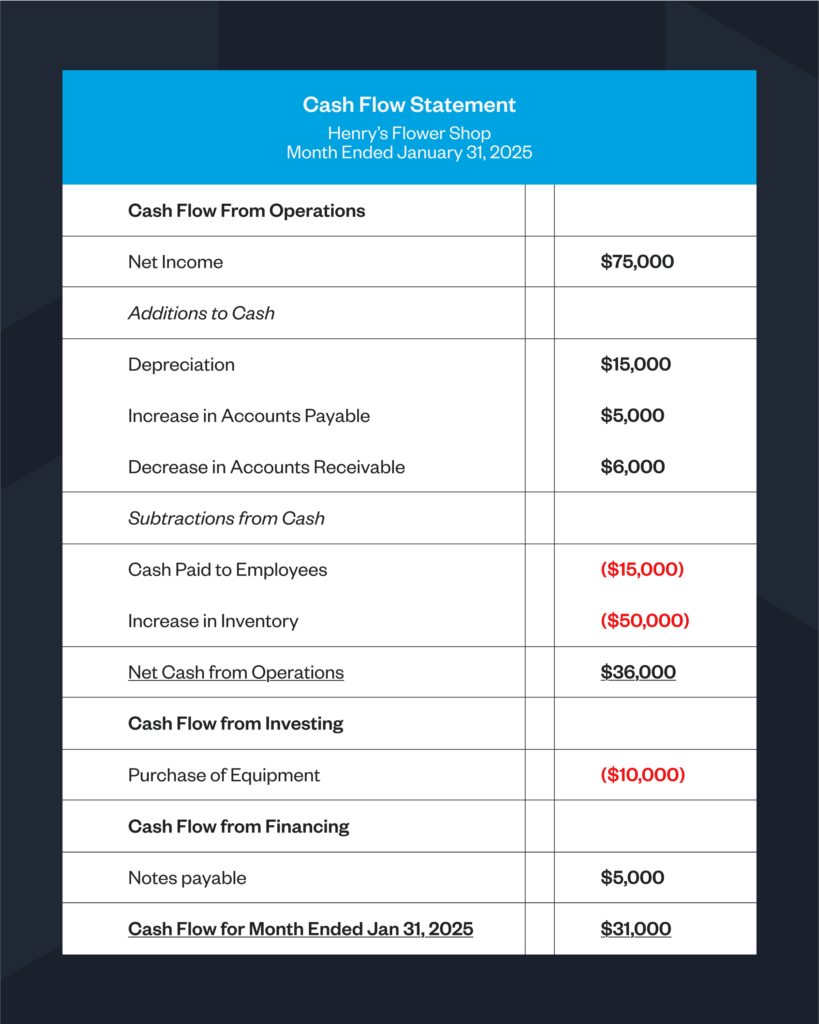
Let’s walk through a simple cash flow statement template to give you a better idea of what you’re looking at.
At the top of the cash flow statement you’ll find the net income number that should match net income on your income statement. In this cash flow statement example, red numbers are subtracted from net income while black numbers are added to net income.
It’s easier to read a cash flow statement if you know what’s going into it. The cash flow statement format includes three main sections: cash flow from operations, cash flow from investing, and cash flow from financing. If you were to prepare this cash flow statement using the indirect method, here’s how you’d fill out the three sections:
1. Cash flow from operations
First, you’ll calculate cash flow that comes from your everyday business operations. From your net income, you’ll need to add back transactions that reduce net income on the income statement but do not affect cash, including depreciation, amortization, decreases in AR, and increases in AP.
You also need to subtract expenses that increase net income on the income statement but do not provide more cash, like the increase in AR and inventory purchases.
In this cash flow statement example, we’ve listed depreciation, increase in AP and decrease in AR as additions in black and cash payments made to suppliers and employees and an increase in inventory as subtractions in red.
2. Cash flow from investing
Next, you’ll calculate cash coming in from investments, such as selling an asset or receiving returns from an investment into your bank account. You also need to subtract the purchase of investments or assets—like machinery, vehicles, appliances or property—if you paid by cash.
Here, we’ve listed the purchase of equipment as a subtraction. However, if the business owner put this purchase on a credit card, they should include this amount in the total notes payable line in the month that they paid down the credit card balance.
3. Cash flow from financing
Finally, you’ll add in cash received through financing, such as a loan balance or—for public companies—issuing stock, and subtract loan repayments, interest paid or dividends paid. Transactions related to business loans are listed as notes payable.
In our cash flow statement example, the number is black because the business received a loan that counts towards increased cash on hand. When a repayment is made, that number would be listed in red and subtracted from the total.
As you can see from this cash flow statement template, while the business had a net income of $75,000, the cash available in the business that month was $31,000. With this information, the business owner knows that they’ve only got $31,000 to cover payroll, pay their taxes and invest in the business at this point in time.
Business owners should return to their cash flow statement monthly or quarterly to better understand and optimize their cash management. It’s important to note that positive cash flow isn’t always good and negative cash flow isn’t always bad. For example, this business spent money on equipment purchases. While this represents negative cash flow from investing, using extra cash on hand for new equipment is a good investment in business growth.
On the other hand, having an excess of positive cash flow several months in a row could mean that you’re not allocating the cash available in your business effectively. Cash is best used for reinvesting in your business or earning interest. To make sure your cash is working hard for you at all times, it’s smart to keep it in a high-yield account like the one Float offers that gives you 4% interest on your balance.
Use Float to take control of your cash flow
It never hurts to have some extra cash on hand. Using business credit cards can give you more flexibility around your cash flow and empower you to seize opportunities even if your invoices haven’t been paid.
Float combines corporate cards with intuitive expense management software. Providing Float cards for your team allows employees to pay with the company card, rather than paying expenses out of their own pocket. This means you can get real-time visibility into spend, rather than waiting on them to submit their receipts. You can also earn interest on the cash you keep in Float.
With Float, you can track all of the expenses you put on your corporate cards in one place and seamlessly pay your vendors, subscriptions and employee reimbursements through a single platform. Float integrates directly with your accounting software, so incorporating expenses paid through Float in your cash flow statement is frictionless. Get the cash you need, when you need it. Try Float for free and boost your cash flow with high-limit corporate credit cards and 4% interest on funds held in your Float Balance.
Despite the array of business expense tracker apps on the market, 42% of Canadian small- and medium-sized businesses (SMBs) still use spreadsheets to manage expenses. Tracking receipts, bills and invoices this way might seem simple, but it’s also time-consuming and prone to human error. Spending precious hours entering expenses into a spreadsheet—or working to resolve discrepancies at month-end or during tax season—takes you away from the important work of running your business.
As your company grows and you need to process more invoices and payments, manual tracking can’t scale with you. Businesses that want to expand their operations and increase efficiency need to find a solution that automates expense tracking and unifies expense management across all of their financial systems.
Let’s talk about how using an expense tracker can help you get insight into the health of your business and gain control over your cash flow. We’ll also go over a few small business expense tracking tools and how to choose the right one for you.
What is a business expense tracker?
A business expense tracker is a system or software that allows you to record and organize all of the transactions related to running your business. While you can use a spreadsheet to enter expenses manually—hey, we’re not here to rain on your parade—we promise it’s much better to use an app that has automated expense tracking and management built in. Accounting software often has integrated expense tracking features, but so do business finance platforms like Float.
How does a business expense tracker work?
In general, expense trackers allow you to input expenses and categorize them—often in a way that aligns with the expense categories reported on your taxes. Both business owners and bookkeepers or accountants can use them to keep an eye on spend and cash flow in the company.
Manual expense trackers like spreadsheets and standalone accounting software require you to bring up your receipts, bills and invoices and enter each line item or total one at a time (fingers crossed you don’t make any typos). Then you have to organize and store your receipts somewhere else—which might mean that you’re juggling different digital files plus an office filing cabinet for physical paperwork.
If you don’t track your expenses as transactions happen, you and your bookkeeper will find yourselves scrambling to hunt down receipts for validation and reconciliation with your bank and credit card statements at the end of each month.
On the other hand, a small business expense tracking app or accounting software that’s integrated with your business bank account and corporate cards automatically records and categorizes your expenses the moment a transaction occurs.
An expense tracking app or software acts as a receipt tracker for business. These types of apps usually provide several ways to directly upload receipts and paper invoices or bills. In many cases, all you have to do to log your expenses is take a photo of the physical copy of a receipt. Using optical character recognition (OCR) technology, the details on the receipt are then analyzed and automatically translated into a standardized format so the expense can be categorized appropriately.
The best business expense trackers also automatically confirm that the transactions recorded on your bank statements match the receipts you’ve uploaded into the system. This can help you or your bookkeeper close the books faster at month’s end.
Why expense tracking software is essential for small businesses
You’ve probably heard that tracking expenses is important, like eating your vegetables or walking 10,000 steps a day. The business version of those healthy habits, tracking expenses is a routine that really does pay off. Keeping an eye on what you spend can help you run your business more effectively and power growth.
Here’s how expense tracking can benefit you and your business:
Get ready for tax season
You need to keep track of your expenses so that you can report them on your taxes. Expenses like office supplies, rent, utilities, insurance, fuel for work-related driving and inventory may be deducted from the year’s total revenue to lower your taxable income. You might also be able to claim business travel expenses if you (and your employees) track them correctly. You need to keep an accurate record of expenses in case you’re ever audited by the Canada Revenue Agency (CRA).
Improve cash flow
Sixty percent of Canadian SMBs face challenges managing cash flow. Tracking expenses gives you the chance to see where your money is going so you can be proactive about balancing spending and income. Staying on top of expense tracking helps you see when cash moves out of your business, so you can make sure you send invoices to customers and follow up on payments in time to cover your own bills. It also enables you to identify areas where you’re spending too much without seeing return on investment (ROI).
Optimize pricing strategy
Understanding how much it costs to run your business helps you make sure that you’re charging enough for your products or services to generate a profit. Tracking expenses allows you to calculate your cost of goods sold (COGS) so you can sell items for more than it costs you to produce them. This allows you to experiment with pricing strategies like creating bundles or offering dynamic pricing during busy seasons.
Plan for growth
Knowing your current expenses helps you refine your budget so you can make room for meaningful investments in your business. With clarity around how much it costs to run your business today, you can get a better understanding of how much it will cost to grow. If your revenue isn’t going to cover your projected expenses, you can make strategic decisions around seeking funding from investors or look into business financing options to take your company to the next level.
Qualify for business loans
You may want to get a business loan so you can make large investments like purchasing new equipment or renovating your storefront. You might also want to use a business line of credit or credit card from a bank to help cover ongoing expenses like inventory or payroll. Many traditional banks need you to provide financial statements and projections to confirm your creditworthiness before offering you a loan. You’ll need a record of your expenses to show the bank how your business is doing to qualify for good interest rates.
Make expense reporting easy
Grab your free Google Sheets expense report template.
✓ Intuitive interface that makes it easy to see transaction details at a glance
✓ Real-time transaction visibility, reporting and automated insights
✓ Integrations with your bank and credit card accounts and accounting software
✓ Secure storage for receipts, bills and invoices
Finding the best app for small business expenses
1. Float
Float is a free business expense tracker and expense management platform built for Canadian businesses. It offers corporate cards, photo receipt capture and reimbursement features, as well as vendor invoice intake and payments to bring all of your expenses together. Float makes it easy to see where your money is going in real time across your entire team. Plus, you never have to worry about manually entering expenses—sorry, spreadsheets! Every transaction that moves through Float is tracked, matched and recorded in the platform and your integrated accounting software.
Cost for small businesses: $0
2. Credit Karma (Mint)
Credit Karma, formerly known as Mint, is an expense tracking tool for personal finance, but it can work for freelancers and sole proprietors as well. It’s a good option if you’re looking for a very simple, free business expense tracker that’s just a step up from using a spreadsheet.
Cost for small businesses: $0
3. QuickBooks or Xero
QuickBooks and Xero are both leading accounting software options that include expense tracking features and can be integrated with other expense tracking solutions. QuickBooks requires expenses to be entered manually unless you have a connected tracking app that automates the process. Xero has photo receipt capture, automated approvals and seamless reimbursement features built in.
Cost for small businesses:
QuickBooks: $24–$160 /mo.
Xero: $20–$67 /mo.
4. Expensify
Expensify is expense management software best known for its travel booking features. It has cash flow features like automatic bill pay and outgoing invoicing, not just vendor invoice intake. Similar to Float, it also provides corporate cards. Expensify offers 1% cash back on all purchases.
💡Pro tip: Psst… Float offers 1% cash back plus 4% interest on Float Balance funds.
Cost for small businesses: $5–$9 USD per user/mo.
5. SAP Concur
SAP Concur is geared towards larger companies and enterprises that need to manage frequent employee expenses including fuel, meals, and travel. It offers photo receipt capture and automated expense reporting as well as customizable approval flows. It also provides integrated accounts payable (AP) features including invoicing and vendor payments.
Cost: Custom pricing based on business size and invoice volume. No public pricing available.
How to choose the best app to keep track of small business expenses
Frankly, the best app to keep track of small business expenses is the one that you’ll actually use as a part of your everyday workflow. A great app should take care of the manual process of logging and organizing receipts and transactions so that you can focus on high-value tasks that contribute to your business growth.
Look for business expense trackers that are intuitive to use and integrate seamlessly with the other software solutions you use to run your business and manage your finances. Check out reviews from businesses that have similar operations or ask a financial professional what they recommend. Ultimately, you’ll only know if an expense tracker will work for you if you give it a try. Find solutions that offer a free business expense tracker or a free trial that you can experiment with before making an investment.
Simple, seamless expense tracking with Float
Float keeps all of your business expenses in one place, from corporate card spending to vendor invoices and payments. With Float corporate cards, you can track employee expenses in real time and it’s easy for employees to submit receipts directly within the Float mobile app. You can also receive vendor invoices and pay them through Float, which means you can unify all your expenses in a single solution.
Float is more than a business expense tracker. It’s an end-to-end solution that powers better business spending with payments and record-keeping orchestrated seamlessly in one intuitive platform.
Still stuck in spreadsheets, managing expenses manually? Try Float for free and control your cash flow through a single pane of glass.
Tracking business expenses shouldn’t feel like a never-ending paper trail. Yet for many Canadian companies, managing spending still involves manual processes, scattered receipts and reactive budgeting. The result is wasted time, financial blind spots and compliance headaches that slow down growth and frustrate staff—but thankfully, modern expense management solutions are here to stay.
By digitizing and automating how your business tracks, categorizes and reports expenses, you can save time, reduce risk and optimize budgets, all while making it simpler for your team to spend like they need to.
In this guide, we’re breaking it all down so you can learn:
What is expense management?
Why modernize expense management?
How does expense management work?
Expense management vs. spend management
Types of common business expenses and examples
The benefits of an expense management system
How to track business expenses
Best expense management software
Let’s dive in.
What is expense management?
Expense management is the process businesses use to track, categorize, approve and report company spending. It ensures that all employee purchases and expense reimbursements are accounted for and aligned with company policies.
Traditionally, expense management involved paper receipts, spreadsheets and manual approvals, making it slow, error-prone and frustrating for both employees and finance teams. Lost receipts, delayed reimbursements and lack of real-time visibility meant businesses often struggled to keep spending under control. Many businesses still operate this way today.
Modern expense management solutions eliminate these inefficiencies by automating the entire process. With features like real-time transaction tracking, digital receipt uploads, automated approvals and integrated reporting, businesses can gain full visibility and control over their expenses, without the administrative burden.
Get Your Free Expense Policy Template
A clear expense policy is the foundation of good expense management. Not sure where to start? We’ve got you covered.
This free template will help you:
Save time with a ready-to-use policy framework
Customize it to fit your company’s needs
Stay compliant with clear expense guidelines
Download your free Expense Policy Template for Notion or Google Docs and take the guesswork out of managing employee expenses.
Why modernize expense management?
Outdated expense management processes waste time, increase errors and limit financial visibility. According to a Float study, 66% of Canadian SMBs say their team spends too much time on manual data entry, and 50% spend 10 to 40 hours a month on payments and reconciliation. These inefficiencies add up, draining resources and slowing down growth.
Instead, here’s what modern expense management can do:
Eliminate manual inefficiencies – Paper receipts and spreadsheets lead to delays, errors and unnecessary admin work. Automation removes these bottlenecks.
Improve accuracy and compliance – Automated approvals and real-time tracking ensure expenses are tracked correctly and follow company policies, reducing the risk of non-compliance.
Enhance financial visibility – Businesses get real-time insights into spending trends, making it easier to track budgets, control costs and make informed financial decisions.
Speed up reimbursements – Employees no longer wait weeks for expense approvals and payments, improving cash flow and reducing frustration. Faster processing also means fewer payroll headaches for finance teams.
Reduce fraud and errors – Digital tracking flags duplicate transactions, unauthorized expenses, and out-of-policy spending before they become costly mistakes.
Modern expense management systems streamline spending by automating the entire process—from capturing expenses to reporting and analysis.
It starts with capturing expenses. No more lost paperwork or digging through inboxes, because employees can snap a photo of a paper receipt, upload a PDF or forward a digital copy via email to a receipt inbox. Their transactions are then categorized automatically, ensuring business expenses—whether for travel, meals or office supplies—are tracked in the right place.
Once submitted, expenses go through approvals and policy enforcement, following company guidelines to prevent unauthorized spending. Employees then receive faster reimbursements, eliminating long wait times and reducing frustration.
Finally, finance teams can leverage real-time reporting and analysis to gain visibility into spending trends, optimize budgets, and identify cost-saving opportunities.
Expense management vs. spend management
Expense management and spend management serve distinct functions in your organization’s financial strategy.
Expense management focuses on tracking and processing employee expenses, such as travel, meals, office supplies and reimbursements. It ensures that individual spending follows the company expense policy and is properly recorded for accounting and compliance purposes.
Spend management takes a broader approach by overseeing all company expenditures—including vendor payments, procurement, software subscriptions and operational costs. It’s about controlling and optimizing how money flows through the business to improve cash flow, budgeting and cost efficiency.
While expense management ensures that employee spending is efficient and compliant, spend management gives businesses a holistic view of all financial outflows, helping you control costs and plan smarter. For growing businesses, using both is key to financial stability.
Types of common business expenses and examples
Businesses spend money in a lot of different ways. Keeping those expenses organized by type makes it easier to track spending, enforce policies and stay on budget. Here are some of the most common expense categories:
Operational expenses
OpEx are your everyday costs for running the business, like office supplies, utilities, software subscriptions and equipment maintenance. Keeping track of operational expenses helps you manage overhead effectively.
Travel and entertainment
This accounts for flights, hotels, meals and client entertainment when employees are on the road. Some businesses opt to reimburse individual receipts, while others use per diems—a daily fixed amount to cover travel-related costs.
💡Pro tip: If your business offers a per diem, make sure it aligns with per diem Canada rates set by the CRA. Following these guidelines helps ensure compliance while simplifying expense tracking for both employees and finance teams.
Employee reimbursements
Employees often pay for work-related expenses out-of-pocket and submit claims for reimbursement. This can include mileage, meals or office supplies purchased for business purposes.
Purchases made on company-issued corporate cards, such as team-wide software, client gifts, or office expenses. Unlike traditional credit cards, corporate cards offer built-in spend controls and automated approvals, making credit card expense management more efficient.
💡Pro tip: Using corporate cards with pre-set limits and real-time tracking helps businesses prevent unauthorized purchases and simplify credit card expense management, eliminating the need for manual reconciliation and chasing receipts.
Recurring vs. one-time expenses
Some expenses happen regularly, like subscription fees for software, memberships and service retainers, while others are one-time purchases like new office furniture or event tickets. Keeping these expenses organized helps businesses budget more effectively.
Of course, every business has unique spending needs, and these are just a few of the most common categories. A modern expense management system helps you track and organize all expenses in a way that makes sense for your business.
Benefits of an expense management system
Managing expenses manually is slow, tedious and error-prone. A modern expense management system automates the process—and that comes with its perks.
Save time
One of the biggest advantages is time savings. With a modern system in place, expenses are categorized instantly, approvals move faster, and reimbursements happen without delays. Your finance team no longer spends hours on tedious data entry, freeing them up for more strategic work and helping boost productivity.
Reduce risk
The right expense management system also reduces financial risk by providing real-time insight into company spending. With better tracking and dashboards, your business can prevent overspending, improve cash flow management and gain visibility into trends that impact profitability. Cost optimization improves, because you have the information readily available to make smarter spending decisions.
Stay audit-ready
At the same time, compliance becomes simpler, because you can enforce spending policies, catch duplicate or non-compliant expenses, and keep your business audit-ready. With automated approvals and policy controls, it’s easier to ensure every expense follows both your internal guidelines and regulatory requirements.
At its core, a modern expense management system smooths friction, makes spending simpler for everyone in the business, and boosts employee morale.
For employees, business expense management should be simple. A good expense management system makes it easy to submit purchases, get approvals and receive reimbursements without unnecessary back-and-forth.
In short, here’s what employees need to do:
Capture the expense – Snap a photo of the receipt, upload a PDF or forward a digital receipt via email.
Confirm the details – Review automatically categorized expenses to ensure accuracy.
Submit for approval – Expenses that follow company policy move forward quickly, while flagged items get reviewed.
Get reimbursed – Once approved, you’ll get reimbursed quickly.
With the right system in place, it’s truly that simple!
How to choose the right business expense management software
With so many tools available, you may be wondering what’s the best app for managing business expenses?
Not all tools are created equal. The right software for expense management should make tracking and managing expenses effortless while aligning with your business needs.
Here’s what to look for when choosing a solution:
Feature
Does the solution…
Ease of use
☑️ Allow employees to submit expenses easily via receipt photos, PDFs or email?
Automation
☑️ Categorize expenses, enforce policies and streamline approvals without manual work?
Real-time tracking
☑️ Provide live updates on spending so finance teams can monitor cash flow instantly?
Accounting integration
☑️ Sync with your existing financial systems to simplify reconciliation?
☑️ Enforce company policies, flag unauthorized expenses and keep the business audit-ready?
☑️ Ensure employees get reimbursed quickly without delays?
☑️ Grow with your business without becoming clunky or outdated?
The right software for expense management will check off everything on this list and make your finance team look like the rockstars they are.
Best expense management software
There’s no one-size-fits-all solution for business expense management. Many software options on the market act as point solutions, meaning they handle only one part of the full expense management equation—whether it’s receipt tracking, approvals, or reimbursements—requiring businesses to connect multiple tools to cover their needs.
The best expense management software for your business depends on factors like company size, spending habits, and integration needs. Some platforms are built for small teams looking for simple receipt tracking, while others cater to larger companies in need of advanced automation and compliance controls.
Here’s a snapshot of some of the top options in Canada:
Expensify: A global business expense management software with receipt scanning (vs automatic receipt capture via text or app), automated approvals and integrations with accounting software. A viable option for businesses that need international functionality. Cost is a factor here, with per user rates as high as $36 per user per month.
SAP Concur: A more robust enterprise-level solution with travel and expense management features, ideal for larger organizations with complex reporting needs. No corporate card or rewards available.
Emburse Certify: Offers automated expense reporting and reimbursement tools with policy enforcement and mobile-friendly receipt capture.
QuickBooks Online: A small business accounting system whose mobile app offers basic expense automation like receipt snapping and email inbox forwarding.
Float: (That’s us!) We’re a Canadian-built platform offering one central solution for smart corporate cards, automated expense tracking and real-time spending controls—eliminating the need to stitch together multiple tools.
Why Canadian businesses choose Float
Float gives companies complete control over their finances, all within one platform. Unlike traditional corporate cards and expense tools that encourage spending, Float expense management is designed to help businesses spend smarter, not more.
Key features that set Float apart
Finance leaders love how much time and effort Float saves. Just ask Zach Hill, Director of Finance at Athennian:
“We’ve been able to reduce our number of manual expense reports by 80% even with our company headcount growing nearly 40%.”
Zach Hill, Director of Finance at Athennian
Here are just a few reasons why:
Corporate cards, built for control – Issue company cards with custom limits and automatic compliance controls, so there’s no risk of overspending.
Real-time expense management – Employees submit receipts instantly, while finance teams track spending in one easy-to-use platform.
Automated approvals – One-click approvals streamline spend requests, keeping purchases in check without back-and-forth emails.
Integrated accounting – Direct integrations with QuickBooks, Xero and NetSuite make reconciliation seamless and cut down month-end workloads.
Cost-saving features – Earn 1% cashback, 4% interest on deposits and avoid FX fees with USD cards.
Managing business expenses shouldn’t be a headache, but it often can be. If clunky financial processes have started slowing down your team, you may be asking yourself if the time is right to implement a corporate card program.
Before you jump in with both feet, you’ll want to get a sense of how different programs work and which features fit with your company’s needs. Without this knowledge, you risk choosing a solution that adds complexity to your business instead of reducing it.
A well-designed corporate card program should provide clear spending controls, real-time visibility into transactions and streamlined expense management. So, let’s make sure you choose a winner.
In this guide, we’ll walk through everything you need to know to set up a successful corporate card program, from selecting the right provider to setting policies, training employees and optimizing spend management as your business grows.
What is a corporate card program?
A corporate card program centralizes business spending, eliminating the need for employees to pay out-of-pocket and seek reimbursement. Unlike personal or generic business credit cards, corporate cards are issued under the company’s account, with the business handling payments.
The best corporate credit card program will improve visibility, automate expense tracking, and allow finance teams to set spending limits and policies that align with your company’s needs. Because—let’s be honest—no employee loves having awkward conversations about getting reimbursed for work expenses.
Is a corporate card program right for your business?
Maybe! A corporate card program can support different types of businesses in meaningful ways, so let’s explore what you should know to make the best decision for your company.
Here are few common questions about corporate credit cards:
The reality is, fiscal challenges loom large for many startups and business owners. Over a third of businesses in Canada aren’t able to take on any more financing, reporting cash flow as their biggest obstacle. A corporate card program offers flexibility and control for startups and scaleups, ensuring seamless approvals, automated tracking and better cash flow management.
Existing SMBs can also benefit by reducing reimbursement hassles, enforcing clearer expense policies, and leveraging rewards. The right program also minimizes administrative work, giving you time for more strategic priorities, like protecting the bottom line—and actually having time for lunch.
Best business credit cards
Compare top options, fees and benefits for Canadian companies.
The best corporate credit card program streamlines expense management by eliminating the need for manual reimbursements and receipt tracking. With automated workflows and real-time expense reporting in easy-to-use dashboards, finance teams spend less time chasing down transactions and more time on strategic priorities. This efficiency is a game-changer for startups and SMBs with lean teams.
Another key advantage is better cash flow visibility. Corporate credit cards for employees allow businesses to track spending in real time, set limits for individual employees and prevent budget overruns. This level of control is especially valuable for high-growth companies managing tight budgets and scaling operations.
Many programs offer perks like cashback, travel rewards and waived foreign transaction fees, turning everyday business expenses into financial advantages. Programs also help companies build business credit, opening once-stubborn doors to larger credit lines and better financing options as they grow.
Corporate cards vs. reimbursements: Why a card program is the better option
Managing business expenses effectively is crucial for maintaining financial health and operational efficiency. Traditionally, companies have relied on employee reimbursements, where employees pay out-of-pocket for business expenses and later seek repayment. This can be done through a standalone reimbursement program or as part of your payroll. While this method might seem like it gives the business more control over spending, it often leads to challenges in visibility, control and employee satisfaction.
Implementing a corporate card program addresses these issues by providing enhanced oversight and a more streamlined process.
But how can you ensure employees aren’t overspending when given access to company cards?
Overspending is the biggest concern businesses have around traditional corporate card programs. Issuing cards to employees can feel like it requires a high level of trust, as many businesses worry about potential misuse on non-approved expenses. This concern is especially significant for CFOs and finance teams focused on maintaining strict budget controls—and, in these uncertain economic times, this includes pretty much every business in Canada.
But the problem with relying solely on reimbursements is that it places the financial burden on employees, requiring them to front personal funds for business-related expenses. This approach can lead to both employee dissatisfaction and financial strain, especially if reimbursements are delayed. Employees get frustrated by having to wait until the next pay cycle or even month-end to get back funds they’ve put on personal cards. Additionally, companies miss out on potential rewards (e.g. cashback) and added visibility (e.g. surprise employee expense reports at month-end) that come with corporate spending, both of which could otherwise contribute to the organization’s financial well-being.
Modern corporate card programs like Float combine the advantages of traditional corporate cards and the control of reimbursements. Here’s how Float addresses these concerns around over-spending:
Real-time visibility: Get immediate insights into all transactions, so your team can monitor spending as it happens. This transparency ensures that any unauthorized expenses are quickly identified and addressed. It’s easier than ever to track what happens right as it happens.
Customizable spending controls: Set specific spending limits and policies for each cardholder (including vendor-specific cards), ensuring expenditures align with company budgets and policies.
Automated expense management: Automate expense tracking and reporting, reducing administrative burdens and minimizing the potential for errors or fraudulent claims.
Employee empowerment without financial strain: By providing corporate cards, employees are relieved from the need to use personal funds for business expenses, leading to improved satisfaction and morale.
Implementing a corporate card program actually provides more financial control and rewards, while helping to foster a positive and efficient workplace culture.
How to set up a corporate card program
1. Assess business needs
Evaluate your current spending patterns before implementing a corporate credit card program. You may not need a program if your business purchases are minimal or centralized. However, companies with distributed teams, frequent travel or high recurring expenses (think software subscriptions or advertising) can benefit significantly.
Next, consider the number of employees making purchases, the types of expenses that could be consolidated under a corporate card and the potential rewards or cashback opportunities. A well-designed program will give you control and efficiency, particularly for remote teams that need seamless purchasing capabilities.
2. Choose the right provider
Selecting a corporate card provider depends on business priorities. Some companies are motivated by cashback and rewards (okay, we all love these), while others focus on control and automation. Key features to evaluate include customizability, automation for reconciliation and strong spending controls.
Another critical factor is the ability to issue virtual and physical cards on demand. This ensures your employees will have the access they need without unnecessary risk. Choosing a flexible provider means the program can evolve with your business rather than become a bottleneck.
3. Set up policies and controls
Establishing a clear company credit card policy is essential for maintaining compliance and preventing misuse of corporate cards. A well-structured expense policy should outline what kinds of purchases are allowed and any required approvals.
Similarly, a purchasing policy ensures employees follow a standardized process for vendor payments, whether or not a purchase order system is in place. A travel policy for companies with frequent travellers should define what types of expenses are covered, from flights to meals and accommodations.
Automated approvals, built-in compliance checks and real-time monitoring can reinforce policies without relying solely on manual oversight.
4. Train employees
Having a policy isn’t enough, so don’t be shy about actively communicating expectations and best practices. Holding training sessions, hosting lunch-and-learn events or providing digital resources can make policies more accessible and easier to follow. All of this will make controlling employee spend easier and something you and your team are both responsible for. Clear expectations benefit both parties.
Training should also emphasize practical aspects of card use, like submitting expenses, determining what types of purchases are permitted and requesting temporary card access if needed. Overcommunication is often better than assuming employees will instinctively follow the guidelines.
Don’t forget: training materials and processes should be revisited regularly as your business scales to ensure they remain relevant and practical.
5. Monitor, adjust and optimize
A corporate credit card program is not a set-it-and-forget-it solution. It requires continuous oversight to maximize efficiency. Finance teams should track spending patterns to ensure expenses align with company policies and identify any inefficiencies, like unnecessary reimbursements due to lack of card access.
Another key area to monitor is the reconciliation process. If month-end closing is still a time-consuming manual task, or if finance teams frequently must correct errors retroactively, this may signal the need for adjustments.
6. When to consider switching providers
A corporate card program that once worked well may become a bottleneck if it lacks automation, restricts access to employees who need it or creates unnecessary administrative work.
If finance teams frequently encounter manual reconciliation, need to increase reimbursement requests or struggle to maintain visibility over spending, it might be time to reevaluate your current provider.
You’ve also got to think long-term. If your corporate card program was initially designed for a small team but now struggles to accommodate a larger, more distributed workforce, switching to a more scalable provider can save you significant time and resources.
7. A better answer to the question: Who gets a corporate card?
Traditional corporate card programs restricted access to senior employees, but modern solutions allow businesses to issue cards based on need rather than hierarchy. A corporate card should empower your people and simplify spend, no matter how long they’ve been on your team.
With temporary virtual cards, businesses can grant short-term access without permanent commitments.
No more worrying about how to get a business credit card into the right hands in time. For example, imagine issuing a card for a two-day conference that deactivates automatically, or providing an expense card for contract employees. This flexibility reduces reimbursement delays and financial strain on employees while ensuring company funds are available when needed without unnecessary risk.
Best business credit cards
Compare top options, fees and benefits for Canadian companies.
For fast-growing companies, managing expenses at scale can quickly become a challenge. Practice Better, a Toronto-based software company in the health and wellness space, faced this reality as their team expanded and new departments formed. With financial processes still partially outsourced, the finance team needed a more efficient, scalable solution to keep up.
“Things would not get booked in correctly and we wouldn’t know until after close. And by then you’re almost into the next month,” says Deena Lu, Controller at Practice Better.
The company successfully transitioned to an entirely in-house financial model by implementing Float. With automated approvals, built-in controls and real-time expense tracking, Practice Better streamlined operations while mitigating risk.
“[With Float], we’ve decentralized the approval process so that it’s not all on finance,” says Deena. “It’s really the team leads now who are responsible for the budget and can approve their team’s spend requests.”
The result? A more efficient finance team and a company-wide culture of responsible, transparent spending prove that the right corporate card program can seamlessly scale with a growing business.
The smarter way to manage company spend
A well-structured corporate card program streamlines expense management, improves cash flow oversight and empowers employees while maintaining control. It provides you with flexibility in offering corporate credit cards for permanent employees or setting up expense cards for contract staff.
If the benefits sound tempting, it could be time to assess your business needs and see if Float corporate cards could help support your goals. With the right provider, clear policies, and automation, you can quickly scale your financial operations.
We think we’re offering the best business credit cards in Canada, and we’re happy to show you why. Whether you’re a startup, SMB or growing enterprise, the right program can save time, reduce administrative burdens and even unlock rewards.
Book a demo with our team to see how a Float corporate card program could work for you.
Enable team spending without losing control.
Float is a smart corporate card backed by intelligent spend management software. The software provides a real-time overview of individual, department, and category spend so you can scale with insight.
No more Past Due late fees or last-minute-declined-payments because of lack of visibility on your corporate cards.