


Finance Team Efficiency
Best Accounts Payable Software for Canadian Businesses in 2026
Make accounts payable more efficient with AP automation. Compare the best accounts payable automation software built for Canadian businesses.
December 22, 2025


Despite transformative innovations in accounts payable (AP) software like AI-driven optical character recognition (OCR) and workflow automation, 69% of Canadian SMBs still feel that invoice processing and vendor payments need to be more efficient.
The accounts payable system that most growing businesses rely on stifles operations. Twenty-seven percent of Canadian SMBs report that their most pressing challenge is delays in incoming and outgoing payments, while 18% say that cash flow management issues are their biggest obstacle.
In this piece, we’ll discuss why Canadian businesses need better solutions for accounts payable automation and how to choose the best accounts payable automation software in 2025.
What is accounts payable software?
Accounts payable (AP) software solutions automate invoice and bill intake, GL coding, matching, validation, and approvals to streamline the process of paying your suppliers and vendors.
Business leaders often look into investing in accounts payable workflow software when their teams get fed up with tedious manual data entry and when their current approvals and payment processes create frustrating bottlenecks. But beyond just saving you time and labour, the right AP software solutions also give you greater control over your expenses, provide more accurate invoice validation and help you close your books quickly.
The best accounts payable automation software have embedded payment and business options, so you can make EFT payments to your vendors and contractors or pay them via ACH, international wire transfer, cheque or credit card without having to navigate through your online banking portals every time an invoice comes due.
What is accounts payable software?
Accounts payable (AP) software solutions automate invoice and bill intake, GL coding, matching, validation and approvals to streamline the process of paying your suppliers and vendors.
Business leaders often consider investing in accounts payable workflow software when their teams get frustrated with tedious manual data entry, and when their current approval and payment processes create frustrating bottlenecks. But beyond just saving you time and labour, the right AP software solutions also give you greater control over your expenses, provide more accurate invoice validation and help you close your books quickly.
The best accounts payable automation software has embedded payment and business options. This means you can make EFT payments to your vendors and contractors or pay them via ACH, international wire transfer, cheque or credit card without having to navigate through your online banking portals every time an invoice comes due.
Why Canadian businesses need accounts payable automation software
Your AP strategy is where you put your budget into action. Accounts payable automation software is an essential tool for monitoring and controlling where your cash is allocated so you can keep your business running and invest wisely in growth-driving opportunities.
With AP automation software, businesses can:
- Eliminate manual data entry: The best AP software solutions offer OCR that automatically transfers information from invoices and receipts into the system, applying the appropriate general ledger (GL) and tax codes.
- Enhance security and reduce fraud: Two- and three-way matching automatically check invoices against purchase orders (POs) and goods receipt notes (GRN) to ensure you’re paying the right person.
- Improve vendor relationships: If you’re trying to figure out how to pay an invoice faster for a valued vendor, you can schedule transactions and track payments with an AP solution. This helps you reduce days payable outstanding (DPO), build trust with your vendors and take advantage of early payment discounts.
- Control spend and manage expenses: Track spend in one place to get insights into your budget. With an AP automation solution like Float, you can also proactively set limits (not just company handbook policies) on corporate card spending to keep everyone on track.
- Make global payments: Leading AP solutions let you seamlessly pay US and international invoices within the platform.
- Close the books faster: Automatically reconcile invoices in your AP solution with your accounting software.
For Canadian companies, AP automation also simplifies compliance with local tax and reporting standards. Features like automatic GST/HST coding, secure EFT and ACH transfers via Canadian banking rails and CRA-compliant recordkeeping make it easier to stay accurate and audit-ready, all without extra manual effort.
What’s new in AP software for 2026
Accounts payable automation is levelling up fast in 2025. Canadian businesses are moving beyond basic invoice scanning and approval routing to full-scale automation that connects every step of the payment cycle.
AI-driven data extraction has become table stakes, while new machine learning features can now flag duplicate invoices, detect potential fraud and even predict cash flow gaps. Integrations have also improved dramatically. Now, modern platforms sync in real-time with accounting systems and banking partners, cutting reconciliation time from days to minutes.
The biggest shift? Businesses are demanding unified platforms that combine AP automation, spend management and real-time reporting in one place. Instead of stitching together point solutions, finance teams are turning to integrated tools like Float that streamline payments, simplify compliance and provide full visibility into cash flow.
What to look for when comparing accounts payable software in 2026
Today, the status quo accounts payable system for Canadian businesses includes a patchwork of point solutions that breed bottlenecks and hold businesses back.
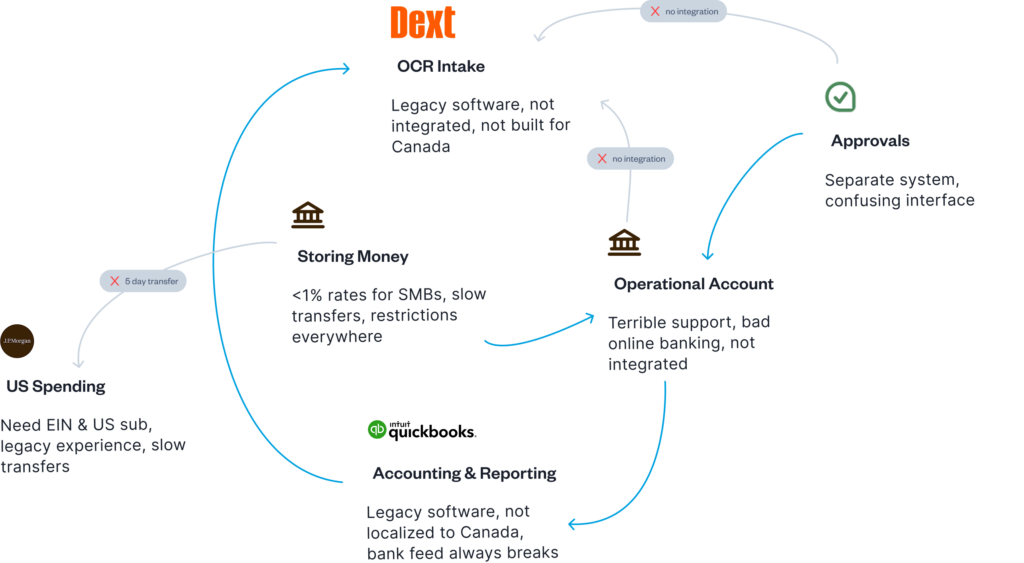
The best accounts payable automation software provides holistic, end-to-end workflows, speedy payments and cash flow management, facilitating financial momentum so you can grow your business.
Look for an AP software solution with key features like:
- AI-driven OCR for automated receipt and invoice intake
- Automatic GL and tax coding
- Automatic two- or three-way invoice matching and validation
- Employee expense management and reimbursement capabilities
- Customizable approvals, controls and automated approvals processes
- Multiple ways to pay invoices, including EFT and ACH, wire, credit card or via platform-based account
- International payment capabilities plus low- or no-fee FX
- Payment tracking for both you and your vendors
- Reliable two-way sync integrations and automatic reconciliation with accounting software
Does accounts payable workflow software handle employee expenses?
Most AP software workflows lump employee expenses—like travel, meals, fuel and supplies—in with vendor invoices, even though they should be treated differently. Typical AP solutions focus on facilitating vendor payments, and most businesses opt to (or have to) reimburse employees through payroll.
With an AP automation platform like Float, corporate card spending and reimbursements happen seamlessly in the same place as invoice management and vendor payments.
Float lets you see how spending across all your corporate cards impacts cash flow as transactions happen. You can also customize spending limits in real time, giving you total control over when and how your team spends. You can use Float to process same-day reimbursements. With corporate cards, you don’t have to worry about reimbursements at all.
Unlike most AP tools that handle only vendor payments, Float brings all spending—cards, reimbursements and bills—into one connected workflow. That means finance teams gain complete visibility into every transaction, from purchase to reconciliation, without needing to switch between systems.
6 best accounts payable software for Canadian businesses in 2026
Float Bill Pay is an accounts payable software small business teams love to use, but there are other options out there. Here’s how Canadian AP software solutions stack up.
1. Float Bill Pay
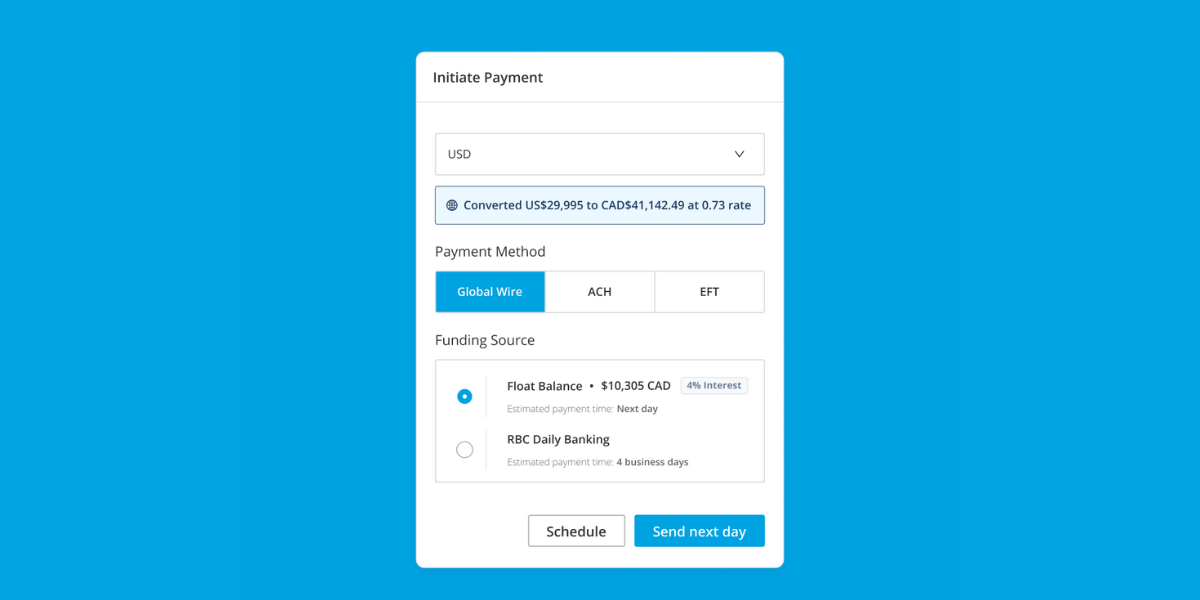
Float Bill Pay is an intuitive financial management platform designed for Canadian businesses of all sizes, built in Canada. Designed for efficiency, it offers seamless invoice and receipt capture workflows powered by leading-edge AI data extraction. With automated GL and tax coding, custom approval workflows and embedded EFT (CAD), ACH (USD), and wire payments for domestic and cross-border transactions, managing payments has never been easier. EFT and ACH payments are free to both send and receive. Float also facilitates FX conversions through its banking partners, providing competitive rates for smooth international transactions.
Because Float is built in Canada, payments move through secure Tier-1 Canadian banking partners, with Float operating as a regulated fintech (not a bank).. Funds are held in segregated accounts with Float’s CDIC member bank partners. That means your information—and your vendors’—is stored safely in-country while you benefit from faster domestic transfers and transparent FX rates for cross-border payments.
Payments made through Float Bill Pay typically arrive within one business day for CAD EFTs. USD and international wires may take 1–3 business days depending on the receiving institution. The platform integrates effortlessly with QuickBooks, Xero and NetSuite through two-way sync, along with HRIS and Slack integrations, to ensure the right team members sign off on invoices.
Float offers Bill Pay on its free Essential plan, with additional features available on paid Professional and Enterprise plans.. No fees are charged on EFT and ACH transactions on Float, offering further savings for your business.
Additionally, Float combines best-in-class accounts payable automation software with corporate and virtual cards for employee spend management. Businesses can also benefit from up to 1% cashback on corporate card purchases and earn up to 4% yield on CAD and USD funds held in your Float Business Account.
Learn more about Float
Get a 10-minute guided tour through our platform.
2. Plooto
Plooto is an AP and accounts receivable (AR) automation software. It’s a good point solution for SMBs looking for status-quo AP software.
The platform offers automated invoice processing alongside customizable automated approval workflows so that invoices are routed to the right person at the right time. The platform also provides in-depth payment history with a comprehensive audit view of transactions.
The cost of Plooto subscriptions varies depending on the plan/audience. It offers EFT and ACH payments at $0.50 per transaction and enables international payments to over 40 countries with no FX fees. However, processing times for payments can vary, with some payments taking between 4 to 5 days to process, while some customers report that payments often take far longer to clear. Limited customer support and a poor payee experience are also common issues with this platform. Plooto is purely an AP/AR solution and doesn’t handle employee spend or reimbursements.
3. Dext
Dext is a bookkeeping automation software with a focus on record-keeping. Its strength is its OCR intake functionality. Dext offers multiple convenient ways for employees to upload receipts on the go, providing real-time expense tracking for the back office. Like Plooto, it offers robust approvals controls. It also provides automated reporting to help get the books closed quickly.
In the past, Dext hasn’t offered payment features, but in 2025, it announced Dext Payments (with Airwallex) rolling out, availability may vary in Canada. If it’s not available to you, you’ll need to make payments through your bank or another platform manually. A Dext subscription costs between $30 and $107.50 per month.
4. Loop
Loop is a banking platform focused on streamlining cross-border payments. It’s built more like a digital banking app than an AP software solution. Loop delivers on flexibility and speed for making global payments, but it’s not the best choice for end-to-end AP automation.
QuickBooks and Xero integrations are available, but may be offline for some accounts; CSV export is an alternative option. You’ll also have to manually validate and reconcile payments made through Loop with other systems.
Similar to Float, Loop offers corporate credit cards in CAD and USD, as well as GBP and EUR, with no annual fees, rewards points, up to $1 million credit limits and a 55-day repayment grace period. The corporate card makes it easier to track and control employee spend alongside vendor payments for a more holistic view of your cash flow. It offers points, but not cash back.
Loop offers a free version, but its paid tiers range from $79 to $299 per month. EFT/ACH payments cost between 0.25% and 0.5% per invoice, plus a $1 fee, so the larger the invoices, the more you’ll pay. Loop provides real-time payment tracking, and payments typically arrive in 1 to 3 business days.
5. Quadient accounts payable automation by Beanworks
Primarily a mailing and customer experience solution provider, Quadient also offers AP automation by Beanworks. Quadient might be a good option for larger, global mid-market businesses and enterprises, but it’s not flexible (or affordable) enough for SMBs. It offers comprehensive AP features like automated purchase order (PO) and invoice processing, as well as automatic GL coding.
You can make payments through an integration with your online banking portal or via cheques, e-cheques, ACH or virtual credit cards, which typically offer around 1% cash back. Payments are automatically reconciled with your accounting software—Quadient offers custom integrations in addition to its long list of financial and enterprise resource planning (ERP) integrations.
There’s no publicly available pricing, but costs are tied to transaction volume, so it’s not ideal for rapidly growing companies.
Accounts Payable Software: Quick Comparison Chart
| Solution | Costs & Fees | Standout Features | Limitations |
| Float Bill Pay | SaaS: $0–$10 per user/mo. (+ enterprise pricing options) EFT/ACH fees: none, wire fee $20/txn. | AI-powered invoice and receipt capture Automated GL and tax coding Custom approval workflows Embedded EFT/ACH & wire payments (CAD, USD)Built-in FX services Payments in 1 business day with Bill Pay Real-time vendor tracking Two-way sync with QuickBooks, Xero, NetSuite | Focus on incorporated businesses vs. freelancers or sole proprietors Built for Canadian-based companies |
| Plooto | SaaS: plans vary EFT/ACH fees: $0.50/txn. | Automated invoice processing EFT/ACH, cheque payments via credit card No FX fees Processing time varies: payments (might) arrive in 4–5 business days AR automation and payment processing Two-way sync with QuickBooks, Xero and NetSuite | Customers find that payments take far longer than 5 business days Limited customer support Poor payee user experience Doesn’t handle employee spend and reimbursements |
| Dext | SaaS: $30–$107.50/mo. EFT/ACH fees: N/A | Leading OCR receipt and invoice intake Multiple ways to upload receipts Real-time expense tracking Robust approval controls Automated reporting QuickBooks, Xero, Sage and other accounting software integrations | Historically, no payment functionality, but Dext Payments was announced in 2025 Doesn’t handle employee spend and reimbursements |
| Loop | SaaS: $0–$299/mo. EFT/ACH fees: 0.5-0.25%/ invoice + $1 International transfers are marketed as free | Global payments Multi-currency corporate credit cards Robust approval controls Real-time payment tracking Payments arrive in 1–3 business days | No invoice intake or storage QBO/Xero integrations exist but may be offline for some accounts; CSV export available FX fees are percentage-based; evaluate plan vs. volume No cash back No interest |
| Quadient accounts payable automation by Beanworks | No public pricing available. Pricing is based on monthly invoice volume and purchase order and payment requirements. | Automated PO, invoice processing Automatic GL coding Real-time spend tracking Robust approval controls Typically provides around 1% cash back with virtual credit cards, depending on the program Two-way sync with QuickBooks, Xero, Sage and more ERP software integrations | Expensive and over-built for SMBs Complex user interface Frequent issues with integrations Transaction volume-based pricing could punish growth Doesn’t handle employee spend and reimbursements |
Accounts payable software vs. expense management platforms
While they sound similar, accounts payable software and expense management platforms solve different pain points. Think of AP software as your business’s vendor payment engine, and expense management as its employee spending tracker.
AP software focuses on the money leaving your business to pay suppliers. It automates invoice capture, approval workflows, payment scheduling and reconciliation. Say goodbye to paper invoices and late payments! Expense management, on the other hand, keeps tabs on what employees spend, from travel and meals to subscriptions, ensuring they stay within policy.
Some platforms (like Float) bring both together, giving finance teams full visibility into every dollar going out the door. That means you don’t have to juggle two systems or manually sync card transactions with invoices at month end.
The right solution unites your payables under one roof. Say hello to saving you time, reducing errors and helping your team make better spending decisions in real time.
How to choose AP software for your business size
Choosing the right AP software starts with knowing your size and spend complexity. Small teams need simplicity and speed in an intuitive platform that offers the right blend of automated invoice capture, approvals and payments without heavy setup or high costs.
For growing mid-sized companies, scalability matters. Look for tiered user permissions, customizable approval workflows and real-time insights that support smarter cash flow management.
Enterprise-level businesses should focus on integration depth, multi-entity management and advanced controls for compliance and audit trails.
No matter your size, ask these four key questions before signing up:
- Does it sync automatically with my accounting software?
- How fast can we onboard and get value?
- Are payments secure and traceable in real time?
- Can we scale usage without doubling costs?
If the answer to all of the above is yes, you’ve found an AP partner that can grow with your business, not hold it back when things pick up speed.
AP software implementation best practices
Implementing new accounts payable software can feel daunting, especially when your existing workflows are deeply manual or scattered across multiple tools. But with the right approach, it doesn’t have to be a headache. A structured rollout ensures your team adopts the platform quickly, maintains accuracy and starts saving time from day one.
Here’s how to roll out AP software smoothly and successfully.
1. Audit your current workflow
Before diving into setup, map how your business currently handles AP: where invoices come from, who approves them and how payments are made. Identify bottlenecks, duplicate steps or pain points. This audit gives you a clear baseline and helps you configure automation that actually matches your team’s needs, not someone else’s ideal workflow.
2. Define goals and success metrics
Decide what success looks like. Do you want to shorten invoice approval time by 50%? Reduce late payments? Cut manual entry hours in half? Setting specific, measurable goals allows you to track ROI and keeps your team aligned on why the change is worthwhile.
3. Build your implementation team
Bring together a small cross-functional team—finance, operations and IT if needed—to champion the rollout. Assign one internal “owner” who will work closely with your vendor’s onboarding team. This ensures accountability and speeds up decision-making during setup.
4. Configure and test in stages
Start with core workflows: invoice capture, coding and approvals. Test with a few real vendors before expanding to the full list. Gradually layer in advanced features like payment scheduling, FX payments and policy automation. Testing in stages helps you troubleshoot issues early and prevents full-scale chaos later.
5. Integrate with accounting software
Don’t leave integrations for last. Connecting your AP system with your accounting platform (like QuickBooks, Xero or NetSuite) ensures transactions sync correctly from the start. Test your two-way sync with real data to confirm that invoices, GL codes and payments appear as expected.
6. Train your team and communicate clearly
A tool is only as strong as the people using it. Offer hands-on training sessions and quick-reference guides for both admins and employees. Set clear expectations for how invoices should be submitted and approved, and when to escalate issues. Communicating early builds trust and prevents resistance to change.
7. Monitor, measure and optimize
Once the system is live, review your KPIs regularly. Are approvals faster? Are you closing the books sooner? Use these insights to fine-tune approval rules or add new automation layers. Treat implementation as an ongoing process, rather than a one-time project.
Rolling out AP automation can free your finance team from the grind of repetitive work, allowing them to focus on strategy and analysis. With a thoughtful plan, clear communication and the right platform, your implementation will go from “Where do we start?” to “How did we ever live without this?”
Integration capabilities: AP software + accounting systems
Strong integrations are the backbone of great accounts payable software. When your AP system and accounting software talk to each other, you eliminate duplicate data entry, reduce human error and close the books faster.
Float Bill Pay connects seamlessly with your accounting platform and your corporate cards, giving you a unified system for managing vendor invoices, employee expenses and payments. It’s one integrated solution that replaces fragmented tools, delivering true end-to-end visibility.
Look for true two-way sync functionality. This ensures invoices, payments and GL codes automatically flow between systems, so when an invoice is marked as paid in your AP software, it’s instantly reflected in QuickBooks, Xero or NetSuite. Bonus points if the platform supports real-time reconciliation and customizable exports for those unique reporting needs.
Integrated systems also improve visibility across teams. Finance leaders can see pending payables alongside cash balances, while department heads can track budgets in real time. The result? Fewer end-of-month surprises and a much smoother audit trail.
Float connects directly with major accounting systems, eliminating manual uploads and reconciliation nightmares. This level of integration turns your AP workflow into a well-oiled, stress-free machine.
Manual payables? Let’s never go back
Accounts payable automation should give your finance team the visibility and confidence to make better decisions, faster. The right AP software keeps your operations smooth, your vendors happy and your books buttoned up with less effort.
If your business is still juggling spreadsheets, email approvals or disconnected tools, it’s time to graduate to a platform that’s built for modern Canadian finance teams.
Float offers exactly that: an all-in-one AP and spend management platform that combines invoice automation, integrated payments and real-time accounting sync. It’s secure, compliant and designed to save you hours each month while improving cash flow visibility and accuracy.
And since Float is purpose-built for Canadian finance teams, it fits seamlessly into your existing banking relationships and regulatory landscape. No workarounds, no uncertainty, just straightforward control and compliance.
Written by

All the resources
Cash Flow Optimization
How to Make EFT Payments in Canada: Complete 2026 Guide
Learn how to make an EFT payment in Canada, avoid extra fees and move money faster in 2026 with modern
Read More
Expense Management
Expense Management System Implementation Guide for Canadian Businesses
Are manual expense processes getting you down? It might be time for an expense management system.
Read More
Corporate Cards
Procurement Cards vs. Corporate Cards: Which is Right for Your Business?
Let's break down how procurement cards and corporate cards work, where each one shines and how Float offers the flexibility
Read MoreSpend time and money
where it counts
Earn up to 3.5% interest on your cash balance and simplify business spending with corporate cards, accounts payable and expense management software.